Media folders and compatible sources
Add local or mounted media folders, or connect a kikoeru-compatible source. Browse folders and organize works.
✦ Built for your audio collection
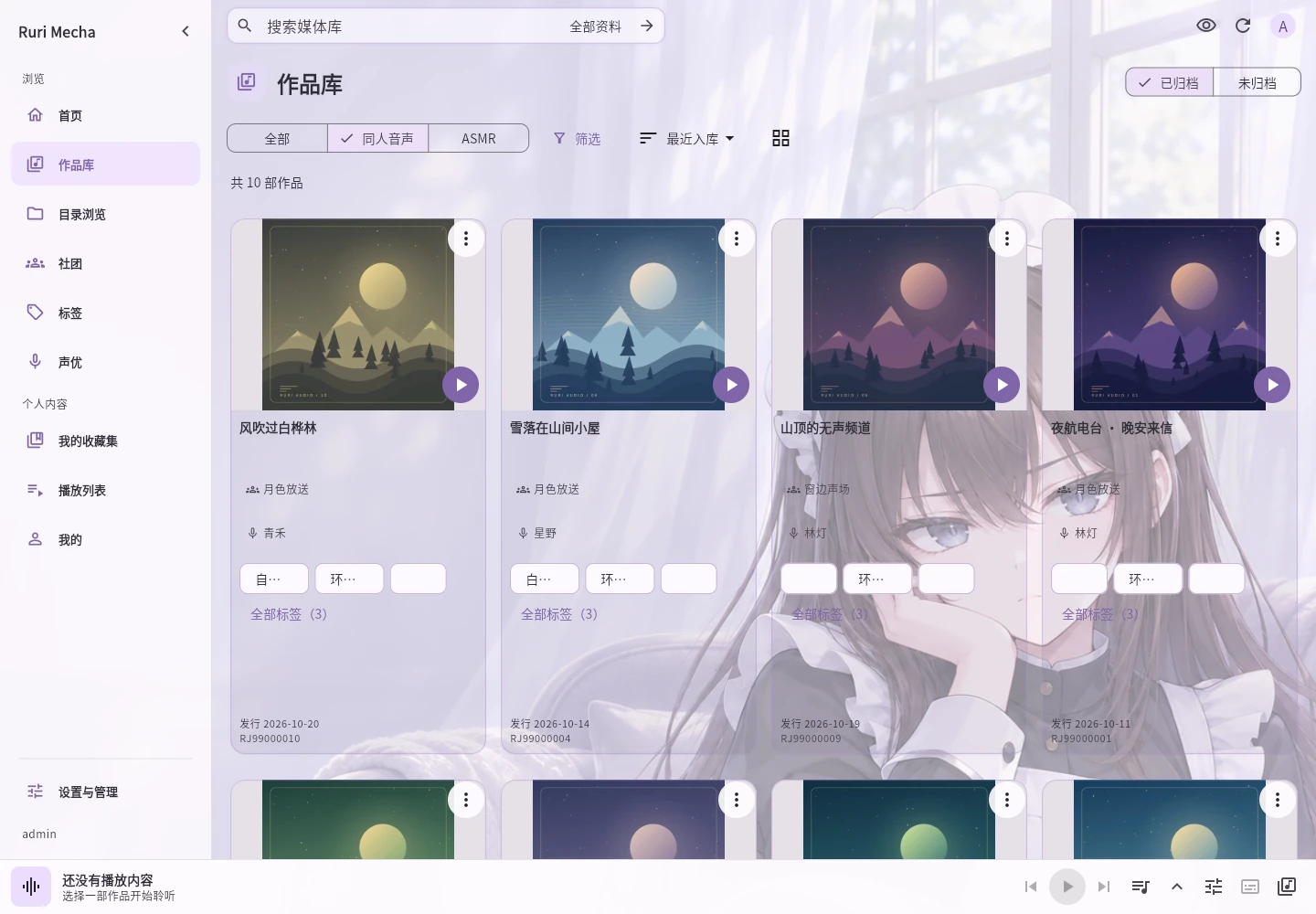
Organize, search, and play your own ASMR and doujin audio on Windows, Linux, Docker, and Android.
Add media you provide. Try the demo as a guest; guest favorites and listening progress are not saved.
The built-in administrator can use the core web and WebDAV features without a server license.
Add local or mounted media folders, or connect a kikoeru-compatible source. Browse folders and organize works.
Find works by title, RJ number, voice actor, circle, or tag. Partial RJ searches and filters are supported.
Fetch details from DLsite for RJ works or edit them manually. Save and view details in different languages.
Browse sound-effects, no-effects, and bonus files. Play an edition and format available on your server.
Play audio and video, manage queues and playlists, resume listening, set a sleep timer, and skip 10 seconds.
Follow timed transcripts and subtitles. Use the web transcript window; administrators can create, edit, and convert transcripts.
Organize works into collections. Save discovered collections and keep individually collected media in Sound drawer.
Hide covers, video, and work text. Reveal content briefly when needed while playback and navigation remain available.
Browse and play original files with a WebDAV player or file manager. Upload, deletion, and progress sync are unavailable.
Supported local files can use compatible transcoding, loudness normalization, and embedded subtitles, depending on format and tools.
Export system data or work details and restore using a new media folder. Move original media files separately.
Use Simplified Chinese, Traditional Chinese, Japanese, or English independently of metadata, audio, and subtitle languages.
An active server license unlocks these experiences; free features remain available.
Android online use and downloads require an active server license. Listen offline after downloading, with background playback and floating subtitles.
Create accounts for others sharing one library, with separate collections, playlists, preferences, and progress.
Preview and save a range of audio or video for playback, or add it to queues, playlists, and collections.
Get started
Download the package for your platform from GitHub Releases. After installation, open it in a browser or install the Android client.
Run the desktop installer, then open Rurimecha from the Start menu.
Get the download ↗Extract the Linux package and run sudo ./install.sh. Requires systemd and glibc 2.35 or later.
Get the download ↗Download compose.yaml from the public repository and follow the guide to configure media folders, ports, and the host identifier for licensing.
Installation guide ↗Windows users can install without using a command line; the installer currently uses Simplified Chinese. Linux and Docker users can follow the guide.
Verify downloads using SHA256SUMS on the release page. The Android APK is available on the same page.
First steps
From installation to playback, every step is in the user guide.
Open the full user guide ↗Choose a package, open Ruri, and use the first-time setup code to set an administrator password and sign in.
Choose a folder containing audio or videos. Enable scanning and work detail fetching as needed.
Open a folder or the library to play, collect, and continue next time.
Trial license
Testing is free. Submit the form to receive a trial license automatically if eligible, without waiting for manual review. Activate within 7 days of issue and use it for 31 days after first activation. Enter the emailed key under Settings & management → Server license.
Testing is free. Future pricing is provisionally CNY 10/month, CNY 60/year, or CNY 90 for a lifetime license, with up to 3 server bindings; clients such as Android do not use additional bindings. The final plan will be announced later. Existing free features will remain free.
7 daysTime to activate after issue
31 daysUse after first activation
OnceTrial eligibility per email
The server needs internet access to activate or update a license. Deactivate on the old server before switching. If it cannot start, contact an administrator through support email.
Enter the email used to receive your license. If a license exists, we'll email a lookup link.
Use your own email address to receive your trial license automatically. Each address gets one trial. Submitting again resends the original license without extending its activation deadline or trial period.
Need help?
For installation, licensing, or device transfer issues, include your platform and the message you see. We'll reply by email.
Email support@rurimecha.top ↗Ruri organizes and plays media files you provide. It does not provide audio work downloads.
The built-in administrator can still use the website and WebDAV. Additional accounts, Android online playback, and saved clips require a valid server license.
Open Server license on the old server and deactivate first, then enter the original key on the new server. If the old server cannot start, email us.